
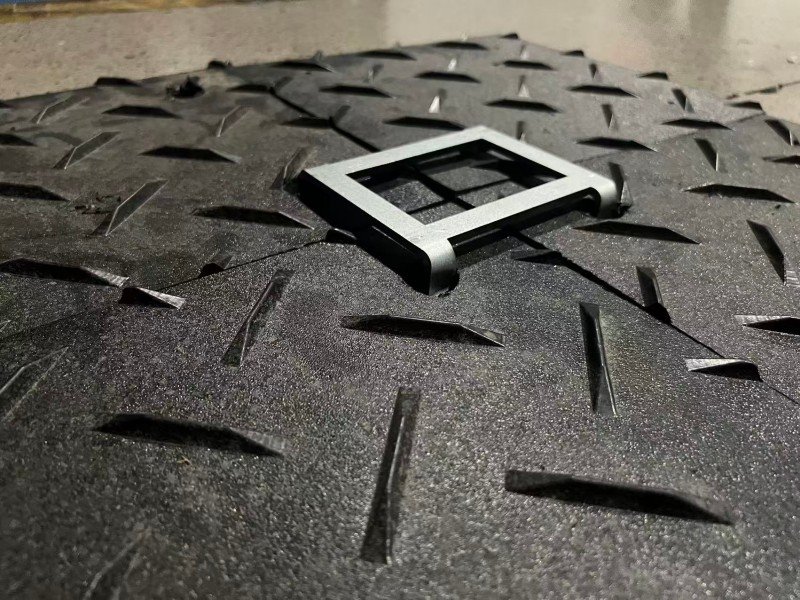
 One loose mat may not look like a problem at first. But once a tire catches the edge, a small gap can turn into mud, rutting, a trip point, or a delayed job.
That is why connectors matter.
For a short, dry, light-duty job, you may not need connectors on every mat. But if your route has vehicles, mud, turns, slopes, repeated traffic, or public foot traffic, locking links can prevent problems that are much harder to fix later.
I think what you care about most is simple: will the mats stay where you put them until the job is finished?
At BKM, we treat connectors as part of the mat system, not as a small accessory. The mat spreads the load. The connector helps the mats stay together as one working surface.
What Locking Links and Connectors Actually Do
Most ground protection mat connectors work in a simple way.
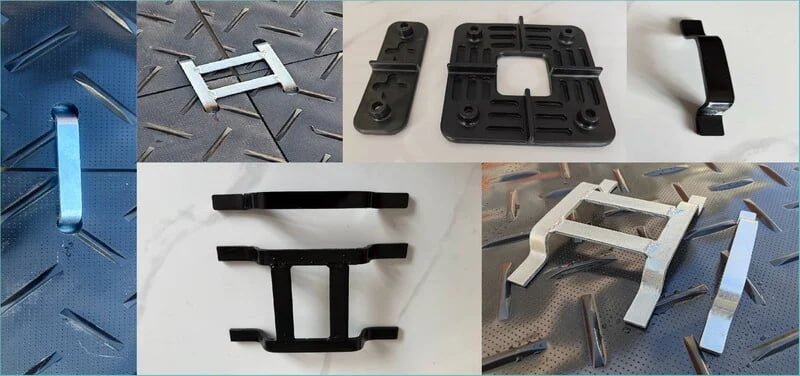
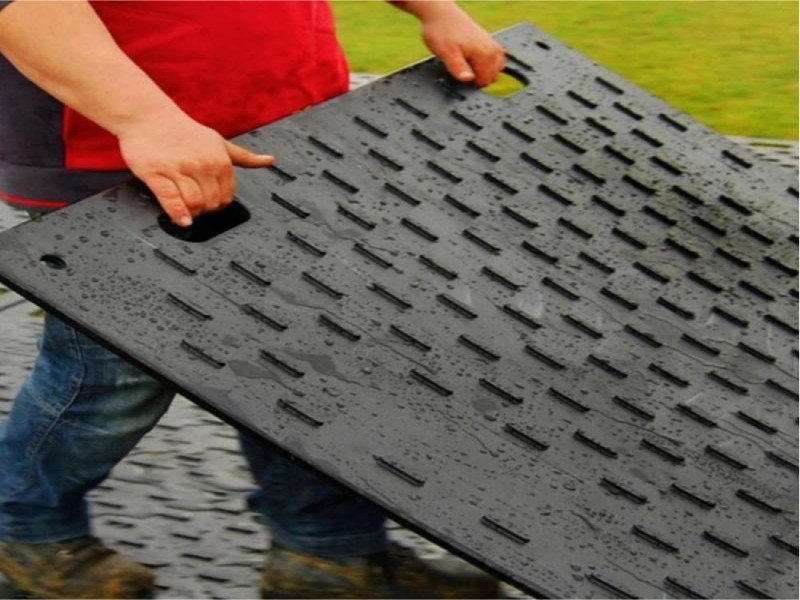
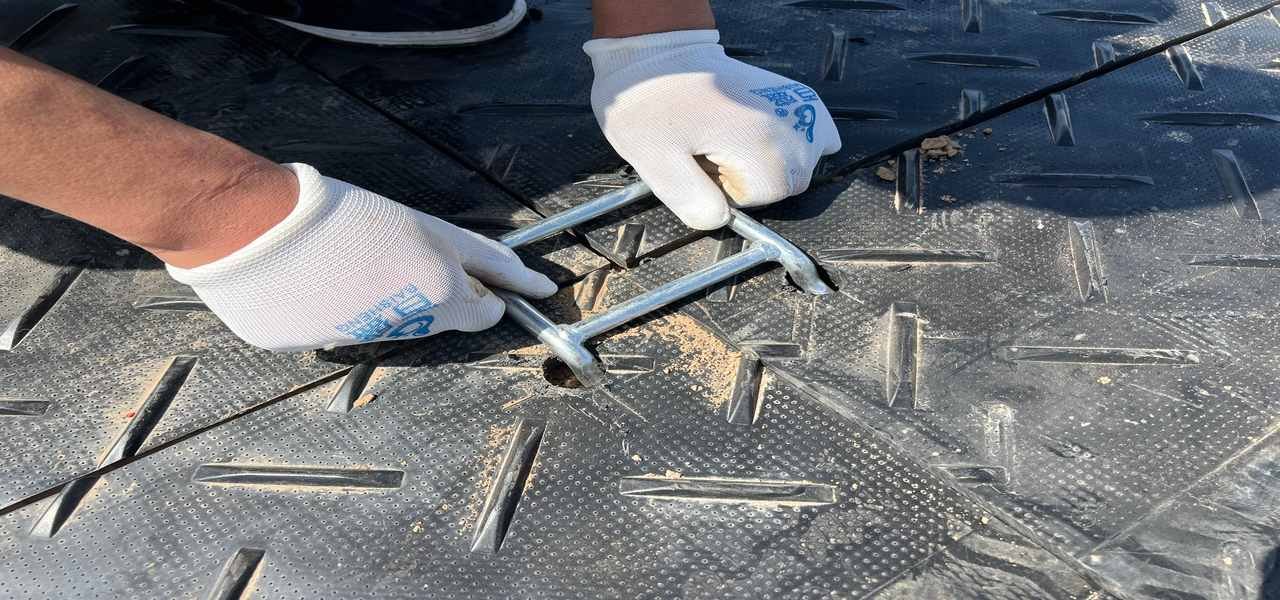
The mats have pre-drilled connector holes near the edges or corners. When two or four mats meet, the connector passes through the holes and locks the panels together.
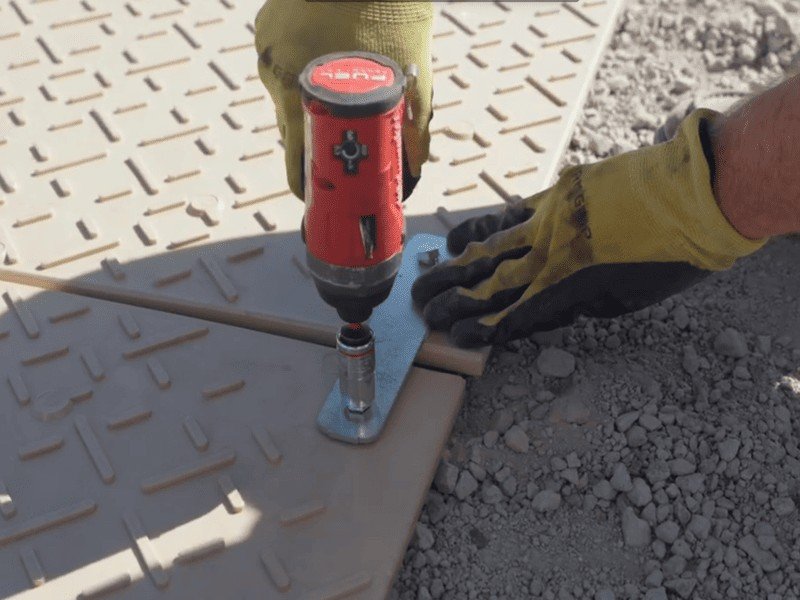
Depending on the mat system, the connector may be a turn-link, pin connector, bolt-style connector, plate connector, or four-way locking connector.
Some are tightened by hand. Some need a wrench, socket, or simple tool.
The purpose is not complicated: the connector keeps the mats aligned, reduces gaps, and limits panel movement when traffic passes over them.
A connector does not magically make the mat stronger. It does not turn a light-duty mat into a heavy-duty road mat. It also does not fix weak ground underneath.
What it does is help the mats behave as a connected temporary surface.
Why Loose Mats Move
Mats usually move because jobsite force is not only vertical.
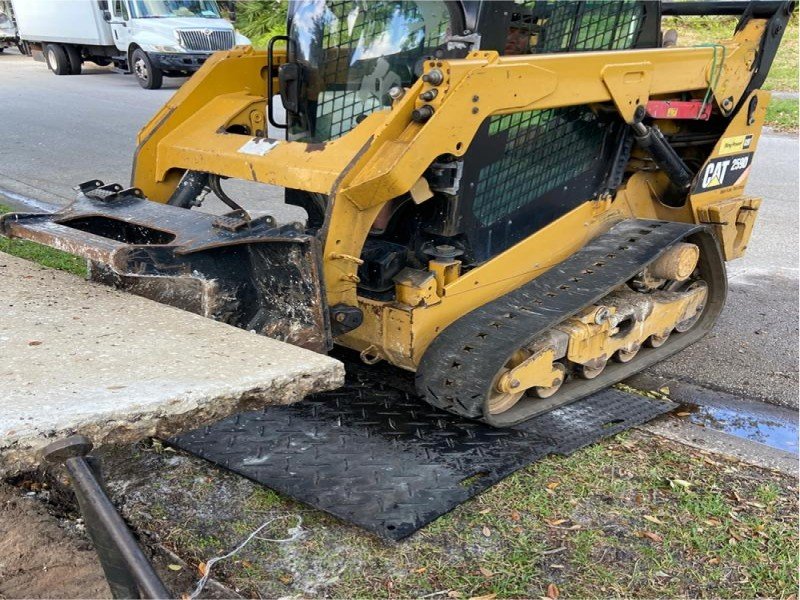
Vehicles do not simply press down. They also brake, turn, reverse, push sideways, and drag mud across the surface.
Skid steers, compact track loaders, forklifts, dump trucks, utility vehicles, carts, and even repeated foot traffic can create movement.
Without connectors, one mat may shift slightly. Then the next mat opens a gap. Then a wheel finds the edge.
Once the edge is exposed, rutting, lifting, mat damage, or a trip point can happen quickly.
For public walking routes, the surface should stay stable, firm, and slip-resistant. A mat route with open gaps, raised corners, or shifting panels can quickly become uncomfortable or unsafe for carts, strollers, wheelchairs, and foot traffic.1
For worksite routes, a walking-working surface also needs to be maintained free of hazards such as loose boards, sharp objects, spills, snow, or ice. Loose panels and raised edges should be treated the same way: fix them before people or vehicles keep using the route.2
Connector Priority by Site Condition
This table is a more practical way to look at connector need. The job length matters, but movement risk matters more.
| Site Condition | Movement Risk | Connector Priority |
|---|---|---|
| Flat, dry, firm ground | Low | Optional |
| Short private pedestrian path | Low to medium | Optional to recommended |
| Firm lawn with one straight vehicle pass | Medium | Recommended at key joints |
| Wet grass or soft soil | Medium to high | Strongly recommended |
| Muddy vehicle route | High | Required in most layouts |
| Slope or uneven ground | High | Strongly recommended |
| Skid steer or compact loader turning | Very high | Required in turning zones |
| Public walkway or event entrance | Medium to high | Strongly recommended |
| Premium turf, pavers, or finished concrete | High | Strongly recommended |
| Multi-day repeated traffic | High | Connect the full route where practical |
The short answer is this: if a shifted mat would only be a small inconvenience, you may keep the setup simple. If a shifted mat could create rutting, slipping, cracking, delay, or customer complaints, connect the mats.
Two-Way vs Four-Way Connectors
Two-way and four-way connectors do different jobs.
A two-way connector links two mats together along an edge. It is useful for straight access roads, simple walkways, and narrow mat rows.
A four-way connector locks four mat corners at one junction. It is better for wider routes, work pads, staging areas, event flooring, and turning zones.
| Connector Type | Panels Controlled | Best Use | Typical Placement |
|---|---|---|---|
| Two-way connector | 2 mats | Straight routes and simple mat rows | Edges between two panels |
| Four-way connector | 4 mat corners | Wider routes, grids, pads, and turning zones | Mat intersections |
| Plate-style connector | 2–4 mats depending on design | Repeated traffic and working platforms | Corners or crossing points |
| Pin or bolt-style connector | 2 mats or system-specific layout | Routes needing tighter locking | Pre-drilled connector holes |
| Turn-link connector | 2 mats or system-specific layout | Fast installation and removal | Edge or corner holes |
For a narrow straight path, two-way connectors may be enough.
For an 8 ft wide equipment route or a larger work pad, four-way connectors usually make more sense because they control movement in more directions.
If the route will carry turning vehicles, connect the full turning pad. Do not connect only the straight lane and leave the turning area loose.
Turning is where mat movement usually starts.
Do You Need Connectors for a Short-Term Job?
Short-term does not always mean low-risk.
A two-hour job with a skid steer turning on wet grass can move mats faster than a two-day pedestrian walkway on firm ground.
A one-day event entrance can create more surface movement than a week of light maintenance traffic.
A short route across a slope can need connectors even if the job only lasts half a day.
For BKM, the decision is not based only on time. It is based on movement risk.
Here is a simple short-term risk guide:
| Short-Term Job Type | Typical Connector Need | Reason |
|---|---|---|
| One straight pass over firm dry ground | Low | Minimal side force |
| One-day residential access with light equipment | Medium | Route may shift if traffic repeats |
| Short skid steer job on grass | High | Side turning force can move panels quickly |
| Temporary event entrance | High | Repeated foot traffic can open gaps |
| Wet or muddy equipment route | High | Low friction under mats increases sliding risk |
| Slope access | High | Gravity and braking force increase movement |
| Public walkway with carts or strollers | High | Gaps and raised edges create usability problems |
| Premium surface protection | High | Sliding can scratch or expose edges |
I know connectors can feel like one more thing to install when the job is short. But if the route moves, the time you saved at setup can disappear during cleanup, repair, or repositioning.
When You Can Usually Skip Connectors
You can often skip connectors when the mats are used in very light and controlled conditions.
A short, straight pedestrian path over firm ground may not need connectors if the mats sit flat and are not likely to move.
A few mats used as temporary protection during a quick residential job may also work without connectors if no vehicle turning is involved.
You may also skip connectors when the mats are placed under stationary equipment and will not be crossed repeatedly. In that case, the main job is surface protection or load spreading under a fixed point.
But even when you skip connectors, the mats should still be checked.
If gaps open, corners lift, or panels start to slide, stop and adjust the layout. Loose mats should never be ignored once they begin to move.
When Connectors Are Strongly Recommended
For vehicle access, connectors are strongly recommended.
If trucks, skid steers, mini-excavators, scissor lifts, forklifts, tractors, compact loaders, or utility vehicles will use the route, connectors help the mats stay aligned.
This becomes more important when the route is muddy, wet, sloped, or used repeatedly.
Skid-steer loaders are compact, powerful machines used for material handling and excavating, and their movement can create strong turning and operating forces in a small area.3
That matters for mat layout. A compact machine can move a loose mat quickly if the route is too narrow or the turning area is not connected.
For construction equipment routes, the access surface should be built and maintained to safely accommodate the movement of the equipment using it.4
That is the same practical logic behind connectors: the route should stay usable while the equipment is moving, braking, reversing, or turning.
For event walkways, connectors are also useful. Pedestrians may not create the same load as machinery, but public traffic can open gaps and raise trip points if mats move.
If visitors, workers, carts, wheelchairs, or strollers will use the route, connected mats give you a more stable walkway.
Mud, Wet Soil, and Slopes Change Everything
On dry firm ground, the mat has more friction underneath.
On mud or wet grass, the mat can slide more easily.
Wet soil also has a higher compaction risk under traffic, especially when machinery or repeated passes are involved.5
This is why connectors become more important in muddy or wet conditions.
A loose mat on mud can move even when the top surface has good traction. The top texture helps tires grip the mat. The connector helps mats stay aligned with each other.
If the route is sloped, braking and gravity add more movement. In that case, connectors help, but layout may matter even more.
For slopes, BKM would usually consider a wider route, more connected joints, better ground preparation, and sometimes a different path.
Connectors help control movement. They do not replace proper route planning.
Connector Placement Guide
Not every short-term layout needs every joint connected. But stress points should be connected first.
| Route Area | Connector Priority | Practical Reason |
|---|---|---|
| Starting entrance | High | First wheel contact often moves mats |
| Exit point | Medium to high | Tires can drag mats when leaving the route |
| Straight dry section | Low to medium | Lower side movement |
| Muddy section | High | Lower friction under mats |
| Turning zone | Very high | Side force is strongest here |
| Loading or unloading area | High | Braking and repeated positioning |
| Slope | High | Gravity and braking add movement |
| Public walkway | High | Gaps and raised edges affect safety and comfort |
| Premium turf or pavers | High | Movement can expose or damage surface edges |
| Work pad | High | Equipment may turn, swing, load, and reverse |
For short jobs, connect the high-stress areas first: entrances, exits, turns, slopes, muddy sections, and repeated traffic zones.
That gives you the most benefit without making the layout more complicated than necessary.
How to Install Connectors Correctly
The best connector will not help much if it is installed carelessly.
Start by preparing the ground. Remove large stones, sharp debris, broken concrete, branches, and anything that can make the mat rock or sit unevenly.
A connector should not be used to force badly misaligned mats together.
Lay the mats flat and align the connector holes. Do not drag one mat into place by forcing the connector through a misaligned hole. That can damage the hole and reduce future connector performance.
Insert the connector through the aligned holes and lock it according to the connector design.
If the connector uses a turning plate, make sure it is fully turned into the locked position.
If it uses a pin or bolt, make sure it is fully seated and tightened enough for the job.
After the first few vehicle passes, check the route again. Mats can settle into the ground, especially on mud or grass.
If a connector loosens or a mat shifts, adjust it before the route gets worse.
This small inspection step often prevents a much bigger problem later.
Do Connectors Damage the Mats?
Connectors should not damage the mats when they are installed correctly and used within the mat’s intended application.
Damage usually happens when connector holes are overloaded, misaligned, or used in the wrong layout.
For example, if a skid steer turns sharply on a narrow strip of mats, the side force may pull hard on the connector holes.
If the ground is soft and the mats are not supported evenly, the connector area may also experience extra stress.
The solution is not simply a stronger connector. The solution is a better layout.
If vehicles turn, widen the area. If the ground is soft, use more mats and reduce edge loading. If the route is sloped, consider another path or a more secure system.
If the equipment is too heavy for the mat, move to a heavier-duty mat system.
Connectors help control movement, but they cannot replace proper mat selection and site planning.
What Happens If You Do Not Use Connectors?
If you do not use connectors on a low-risk job, nothing may happen.
The mats may stay in place and the job may finish smoothly.
But on a higher-risk site, loose mats can create several problems.
The panels can separate and expose mud. Tires can drop into gaps. Corners can lift. Workers may trip. Vehicles may push mats out of alignment.
A mat edge may become overloaded and bend into soft ground. On premium surfaces, loose mats may slide and scratch the surface underneath.
On construction sites, mud and loose soil can also create tracking and runoff problems if the access route breaks down.6
That is why I treat connectors as inexpensive protection for routes with movement risk.
They are not always required. But when they are needed, they are usually needed before the first problem appears.
BKM Practical Recommendation
For a short-term light-duty job on flat, firm, dry ground, you may not need connectors on every mat.
For a short-term job with vehicles, mud, slopes, turns, public access, premium surfaces, or repeated traffic, you should use connectors.
Even if the job only lasts one day, movement can happen quickly.
A practical BKM approach is:
- use loose mats only for low-risk, straight, light-duty access
- use two-way connectors for straight mat roads and simple walkways
- use four-way connectors for wider routes, work pads, and turning areas
- connect entrances, exits, corners, slopes, and repeated traffic zones first
- widen the layout where vehicles turn instead of relying only on connectors
- check the connectors after the first few passes
The right question is not only “How long is the job?”
The better question is: what happens if one mat moves?
If a shifted mat would only be a small inconvenience, you may keep the setup simple.
If a shifted mat could cause rutting, cracking, slipping, equipment delay, or customer complaints, connect the mats.
BKM can support ground protection mats with connector holes, two-way and four-way connector options, custom hole layouts, common mat sizes, custom dimensions, surface textures, colors, logo marking, private-label needs, and export packaging.
BKM also provides connector systems for mat layouts. Other site tools, such as ramps, hooks, storage racks, straps, anchors, or underlayment, can be prepared locally if your project requires them.
FAQ
Do I need connectors for ground protection mats?
You need connectors when mats may shift, separate, or lift under traffic. For vehicle access, mud, slopes, turns, and repeated use, connectors are strongly recommended.
Can I use ground mats without connectors for one day?
Yes, if the job is light, flat, dry, and controlled. But for vehicles, mud, public access, or turning movement, one day is still enough time for mats to shift.
What is the difference between two-way and four-way connectors?
A two-way connector links two mats together. A four-way connector locks four mat corners at one junction. Four-way connectors are better for wider routes, work pads, and turning areas.
Do connectors increase the load capacity of the mats?
Not directly. Connectors help mats stay aligned and work as a system, but they do not change the material strength or fix weak ground underneath.
Are connectors needed for pedestrian walkways?
For short private walkways, maybe not. For public events, busy routes, wheelchairs, carts, or wet ground, connectors help reduce gaps, movement, and trip risks.
Can connectors prevent mats from sliding in mud?
They help reduce movement between mats, but they do not replace traction, drainage, proper layout, or site maintenance. On muddy routes, use connectors together with textured mats and wider coverage.
Should I connect every mat?
For heavy traffic, turning areas, slopes, and multi-day routes, yes, connect as much of the system as practical. For light short-term use, focus first on entrances, turns, slopes, and high-movement areas.
Can connectors damage the mat holes?
They should not damage the holes when installed correctly and used within the mat’s intended application. Damage usually happens from misalignment, sharp turning on narrow layouts, unsupported ground, or equipment that exceeds the mat system’s intended use.
Conclusion
Locking links and connectors work by joining ground protection mats through connector holes so the panels behave as a more stable temporary surface.
They reduce mat separation, limit shifting, and help keep routes safer and easier to manage.
For a short-term job, you may not need connectors everywhere. But if your job involves vehicles, mud, slopes, turns, repeated passes, public walking routes, or premium surfaces, connectors are worth using.
At BKM, our practical rule is simple: if mat movement would create a problem, connect the mats before the problem starts.
References
U.S. Access Board. “Chapter 3: Floor and Ground Surfaces.” https://www.access-board.gov/ada/guides/chapter-3-floor-and-ground-surfaces/ ↩
Occupational Safety and Health Administration. “1910.22 - General Requirements.” https://www.osha.gov/laws-regs/regulations/standardnumber/1910/1910.22 ↩
CDC / NIOSH. “Preventing Injuries & Deaths from Skid-Steer Loaders.” https://www.cdc.gov/niosh/docs/2011-128/default.html ↩
Occupational Safety and Health Administration. “1926.602 - Material Handling Equipment.” https://www.osha.gov/laws-regs/regulations/standardnumber/1926/1926.602 ↩
Iowa State University Extension and Outreach. “How and Why to Avoid Soil Compaction.” https://crops.extension.iastate.edu/cropnews/2010/04/how-and-why-avoid-soil-compaction ↩
U.S. Environmental Protection Agency. “Stormwater Discharges from Construction Activities.” https://www.epa.gov/npdes/stormwater-discharges-construction-activities ↩